Article 5 min read
The Categories Your Competitor Hides on Maps, and How to See Them Free
by Daniel Sócrates published
You search your category in your city and see the same three names ahead of you. You open each profile and find nothing special in there.
That is because the part that decides is not visible. The public profile shows one category. The record can hold several, and only the first one shows to anyone looking from outside.
Free extensions exist that show the rest. And there is a right way and a wrong way to use what they show.
What stays hidden
Google decides local order by relevance, distance, and prominence, and relevance starts at the category. A profile in the wrong category never enters the dispute. The full mechanism sits in the article on the three factors.
The primary category is public. The secondary ones, the attributes, and the internal identifiers do not appear in the normal Maps interface. An audit extension injects that data over the results screen, and you start seeing the record the way Google sees it.
Think of reading the package insert instead of the label. The label gives the name of the drug. The insert gives the composition. This is called a profile audit.
The two tools, with their numbers on the table
The guide uses two extensions, and the house rule is to declare the public numbers of any extension before citing it. Both were checked on the Chrome Web Store on September 1, 2026.
| GMB Everywhere | PlePer Local SEO Tools | |
|---|---|---|
| Offered by | Upwards Company Inc. | PlePer, of pleper.com |
| Version | 5.8.0 | 1.6 |
| Last update | August 21, 2026 | March 10, 2026 |
| Users | 300,000 | 70,000 |
| Ratings | 4.6 out of 5, with 112 | 2.9 out of 5, with 50 |
| Declared data collection | personally identifiable information, location, and website content | declares no user data collected |
Notice that the choice is not obvious, and that is why the table exists. 1 2
The more popular and better rated one declares that it collects personal information, location, and content. The one that declares no collection at all sits at 2.9. And neither of them asks for access to your Google account. That already puts the risk below the level of Analytics extensions. The call is yours, with the numbers in hand.
What the screen showed in a real case
We ran the query “restaurante brasilia” (restaurant Brasilia) on Maps with both extensions active, on September 1, 2026. 3
Under each result sat the injected data: every category on the profile, coordinates, rating, review volume, and the internal identifiers, including the Knowledge Graph one.
And in the analysis panel, the category spread across all results at once:
| Category | Profiles | Share |
|---|---|---|
| Restaurant | 17 | 30.36% |
| Italian restaurant | 4 | 7.14% |
| Steakhouse | 3 | 5.36% |
| Seafood restaurant | 3 | 5.36% |
| Wine bar | 3 | 5.36% |
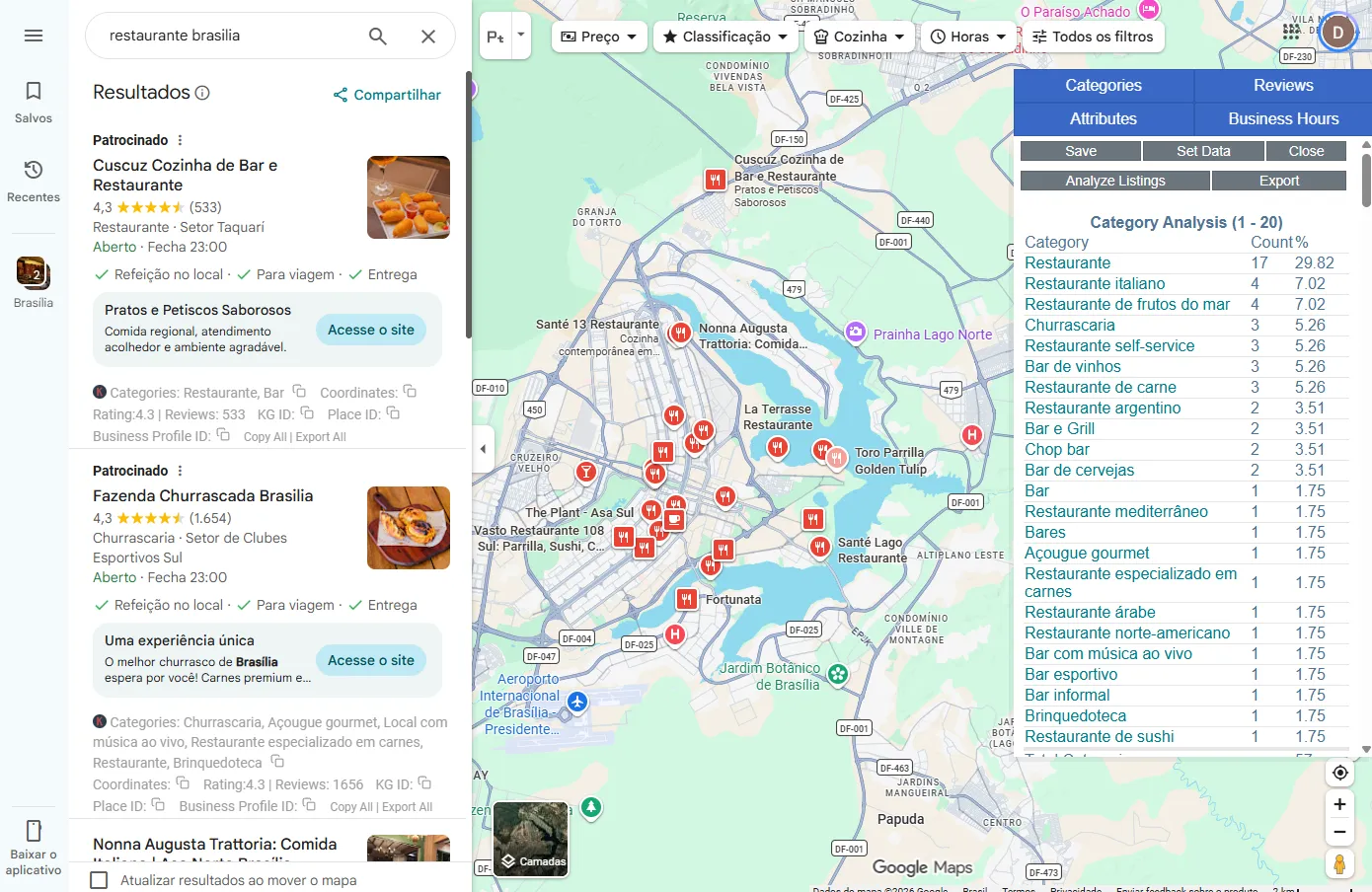
The reading that matters is in the first row. Almost a third of the profiles compete under the most generic category available. The specific ones carry three or four competitors each.
A steakhouse that registers as “Restaurant” chose to fight 17 rivals instead of three.
One detail from the same screen deserves a record. The result with more than 32,000 reviews, the largest of the search, uses the specific category as its primary one, and not the generic one. 3
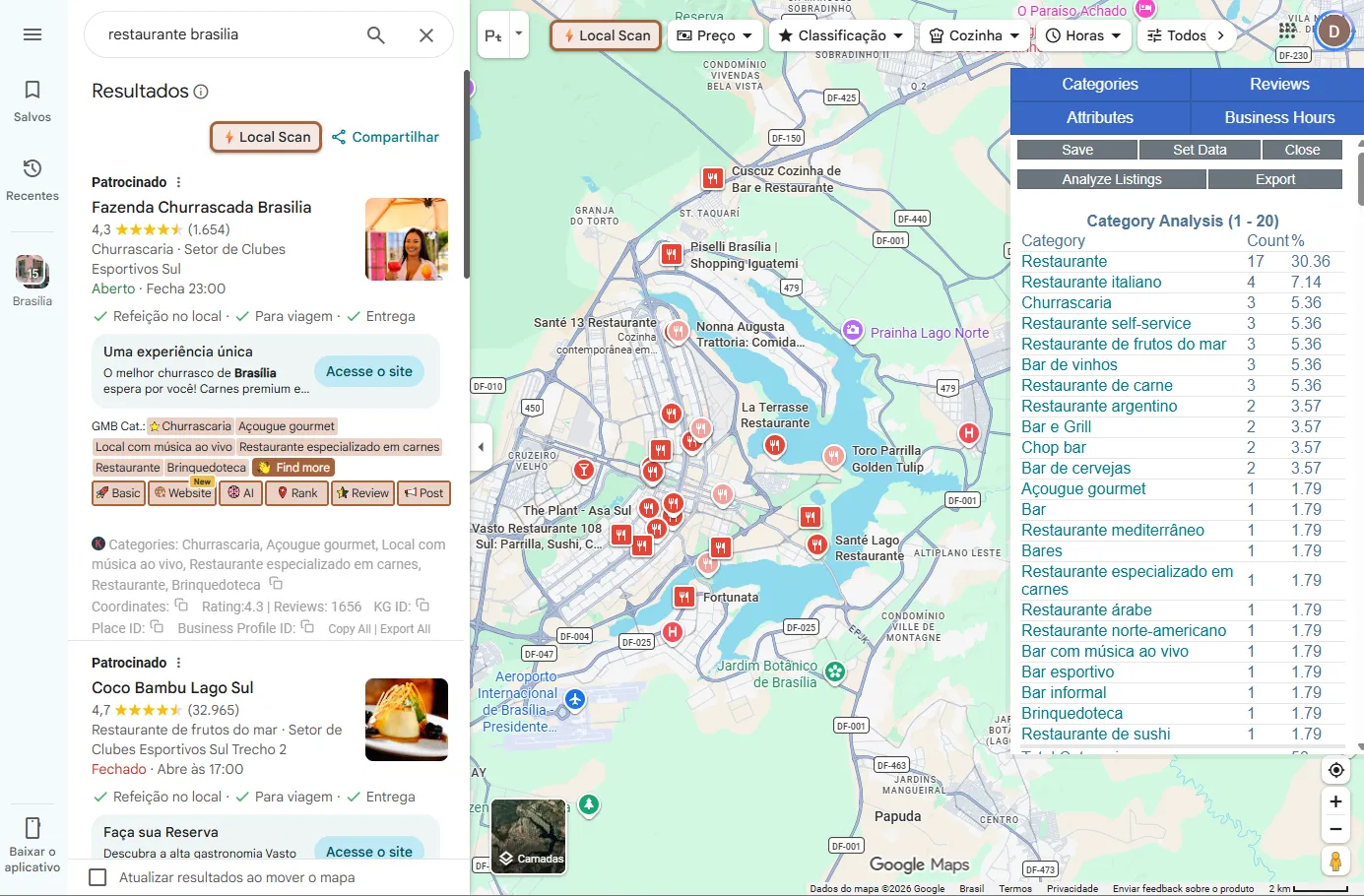
And another detail, which we produced on purpose: the analysis ran twice on the same day. The share of the generic category came back as 29.82% in one run and 30.36% in the other. The result set changes between one search and the next. That is the proof, on screen, that this kind of reading is a sample of one moment, and not a fixed measurement. 3
What that same screen caught in the act
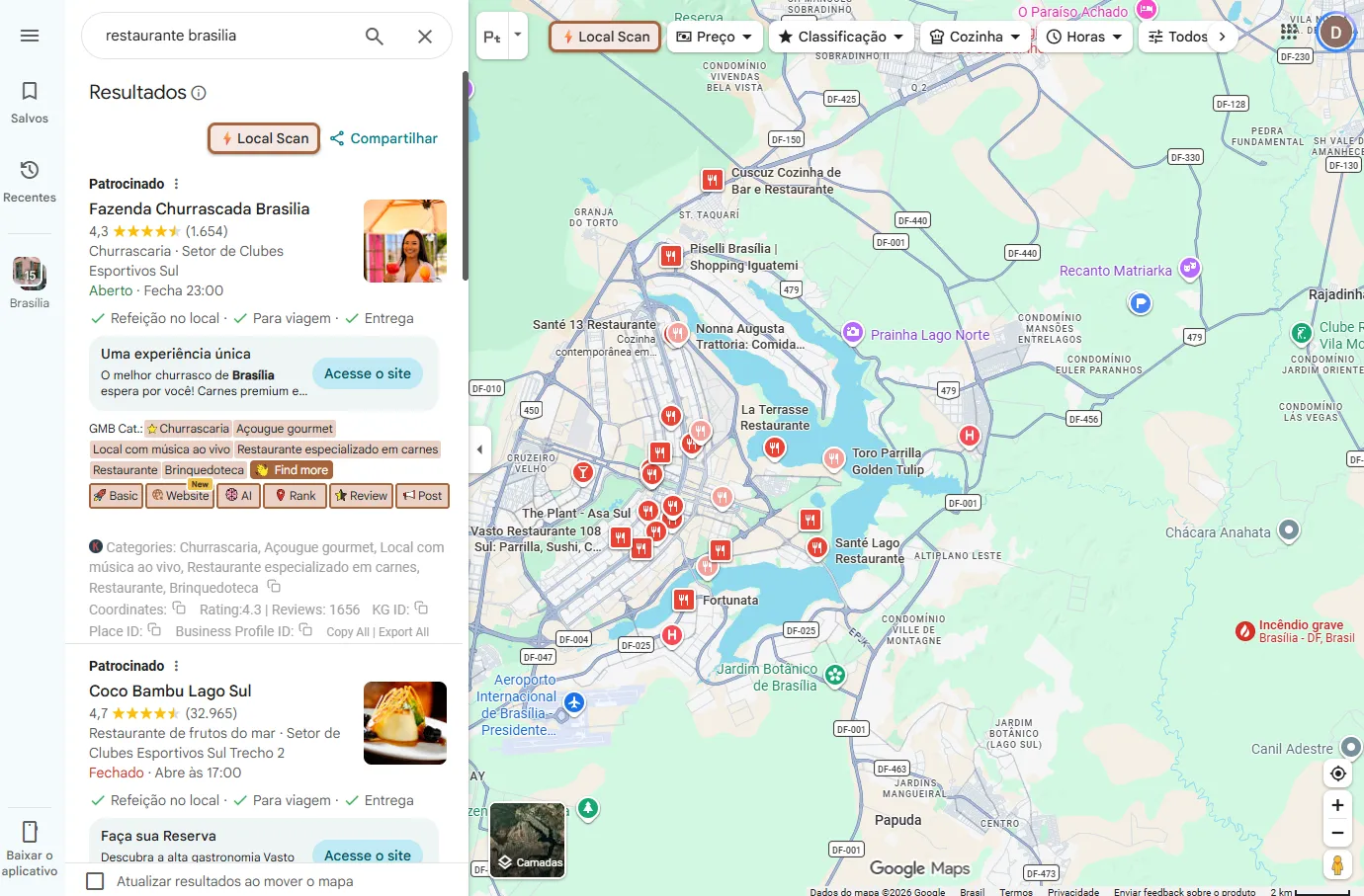
One of the sponsored results in the search, a steakhouse, listed six categories on its profile. The extension marks the primary one with a star, and the primary one was correct. The pile-up sat in the secondary ones, and among them, a children’s play area. 3
The official Google guideline says the opposite of that: “Use as few categories as possible to describe your overall core business from the provided list”. And the instruction is to complete the sentence “this business IS a”, and not “this business HAS”. 4
The steakhouse has a play area. It is not a play area. Every category outside what the business is dilutes relevance in the ones that matter, and the same guideline declares that Google “reserves the right to suspend access to Business Profiles” of anyone who breaks the rules. 5
The right use of a catch like this is not to report the neighbor. It is to open your own profile and check whether you are making the same mistake.
The method in four steps
Pull the primary category of the top three. It is the single fact that best explains why they are up there.
Compare it against yours. If the three use a specific category and you use the generic one, that is the fix of the week.
Count reviews per month, and not the total. Total is history. Pace is operation. A profile with 200 frozen reviews loses to one that gains eight a month.
Copy the criterion, never the record. The right category for your business is the one that completes “IS a”. Copying six categories from a competitor copies his mistake along with them.
Frequently asked questions
Is this allowed?
The data these extensions show is public, read from the results page itself. What they do is display together what Maps spreads across different screens.
Does copying the leader’s categories put me ahead?
No. The right category puts you in the right dispute. Order inside it comes from relevance, distance, and prominence, and the official help declares that “there’s no way to request or pay for a better local ranking on Google”. 6
Which of the two extensions should I install?
They do similar work by different routes, and the table of public numbers is above. Check the five items, decide by your own risk criterion, and revisit the choice from time to time, because version, user base, and rating all move.
Can I use several categories on my profile?
You can, within what the business is. The guideline asks for the fewest categories possible, and it tells you to describe what the business IS, not what it HAS. 4
Notes and sources
- Chrome Web Store, “GMB Everywhere - GBP Audit for Local SEO”, by Upwards Company Inc. Version 5.8.0, updated on August 21, 2026, 300,000 users, 4.6 out of 5 with 112 ratings. Declares collection of personally identifiable information, location data, and website content. Consulted on September 1, 2026.
- Chrome Web Store, “PlePer Local SEO Tools”, by PlePer. Version 1.6, updated on March 10, 2026, 70,000 users, 2.9 out of 5 with 50 ratings. The developer declares that no user data is collected or used. Consulted on September 1, 2026.
- Three screenshots from September 1, 2026: the query “restaurante brasilia” on Google Maps with both extensions active, and the category analysis panel opened in two separate runs on the same day. Table numbers follow the second run; the divergence between runs (29.82% against 30.36% in the generic category), the case of the six categories with the primary one starred, and the primary category of the highest-volume result are all as displayed on the screens. Files kept by SEO Genome.
- Google, Google Business Profile Help, “Guidelines for representing your business on Google”,
support.google.com/business/answer/3038177, consulted on September 1, 2026. Literal quotation on categories reproduced in the body. - Same source as note 4. Literal quotation on suspension reproduced in the body.
- Google, Google Business Profile Help, “Improve your local ranking on Google”,
support.google.com/business/answer/7091, consulted on September 1, 2026. Literal quotation reproduced in the body.
Want to see SEO Genome more often on Google? Add it as a preferred source.
Let us look at what the machine understands about your company
A diagnostic conversation, with no slide deck. You bring your website address. We bring what Google and the AI assistants already know about it today.